Saturday, 25 July 2015

Five Minutes of Twitter A Day

If someone stacked a pile of books, magazines, and newspapers in front of me and said, 'You've got 5 minutes, Go!', I'd be hard pressed to do them justice.  But if I find myself with 5 minutes during the day and my iPad or phone nearby, I can be guaranteed to get my money's worth of info! Today I did just that, this time with my laptop.  I started a timer and jumped on to Twitter.  My topic of curiosity for the day was digital learning with a focus on Assistive Technology. In the first 4 minutes I selectively skimmed over 40 tweets and links. For the last minute, I favourited, copied and pasted, added to Delicious and re-skimmed my top 5.   Here's what I found.

http://www.teachsmart.org/ A cool device named Tap-it.
http://goo.gl/4413wk


http://teachingeverystudent.blogspot.ca/2015/07/does-assistive-technology-make.html Great blog article by Karen Janowski posted today about the differences assistive technology can make. Excellent examples across grades of situations we see in all classrooms.

http://paper.li/bwwojci/1361415475?edition_id=2e4d61b0-30e7-11e5-a22c-0cc47a0d164b#!technology A link to #atchat weekly, just filled with great articles from which I chose....

http://bdmtech.blogspot.ca/2014/02/whats-on-my-ipad-assistive-apps-i-use.html Apps to assist dyslexic students. Great list!

http://paper.li/markwcarbone/1343530609?edition_id=a059ca10-32d5-11e5-96e1-0cc47a0d1605#!technology The iPad 3 release date has been delayed!


http://goo.gl/6c7BwE
While the last one is not so AT related, I did spend 30 seconds of my time thinking about paper.li and trying to decide whether I am a fan of this convention that is often seen in Twitter. I have since done a little more research....at least 3 more minutes, and have found this description, 'Paper.li is a content curation service that lets you turn socially shared content into beautiful online newspapers and newsletters.' Decision made...I like it. It is another time saver for me.

This was a great excercise in metacognition, it made me think about how I am learning.  From this I have new conclusions.  1) I need to make better use of bookmarking tools.  2)  I should emphasize skim reading more in my class next year.  3)  There are many assistive technology tools out there I haven't seen yet. 4) It is important to carefully choose who you follow on twitter.  5) I'm a current fan of paper.li.
Those are a lot of take-aways from a 5 minute excercise.  I highly recommend it!


Tuesday, 21 July 2015

Ask and Ye Shall Learn

Overworked and underappreciated.  An Educational Assistant can make a world of difference in a classroom.  I was lucky to spend 5 years with 2 of the best out there.  I was thrilled when I heard Brenda took on an Itinerant position with our board that allowed her to pursue her skills and interests in technology.  She was our 'go to' person in the classroom and now has a chance to help so many others with her expertise.  Ever willing to help out, she agreed to answer a few questions for me.   I'm glad to have had the chance to learn from her again.  My big takeaway from this is to remember that it is so important to hear about other viewpoints in this large world of education.  


Assistive Technology Interview with Brenda Alexander
LD Itinerant Resources
Educational Assistant


1)  Question:  How can students receive (eligible) Assistive Technology support?
A referral by a school SERT for a student needing support on equipment can be made through the SERS system. It goes to our program leader, consultant who then decides if a teacher CYW or EA is required for support. Depending on the needs a schedule is set up between the school and person in to support. EAs are under the supervision of the teacher on the LD Team assigned to the school and work with them to provide support.

2)  Question:  Can anyone get AT professional development?
Most PD offered at our board is designated for teachers only. An EA can register but will only be contacted if there is an empty space in the class. This contact is sometimes the same day as the course and many EAs with families can't make changes to schedules that quickly. Occasionally PD is offered on designated PD days. These courses have a small number and with  900+ members in our association many EAs are unable to secure a spot. Being part of an LD team I have been included in all training offered to the teaching staff on our team.

3)  Question:  What is the most sought after AT?


Currently our team is supporting GAFE( Google apps for education). We also support Kurzweil, Dragon Naturally Speaking, Wordq and others.
With the availability of chromebooks in almost every classroom our team have been supporting both staff and students with Google Apps this past school year.
Students respond well to programs and apps that use voice to control them or to input information.
http://goo.gl/yl7p9V
4)  Question:  What tools do you need more of?


The best tool we could have is well trained EAs , the students are directly supported by the least trained individuals.


I would like to see all students with a chromebook and with instructions on how to use all apps and extensions. For LD students the laptops run more smoothly, that is less connection drops on wireless, easier setup for apps and with all passwords etc . Having individual laptops for LD students ensures they can always access equipment to complete assignments. Kurzweil is still a more reliable software program than the many apps needed by a student to complete the same tasks.
A tool I would like to see is an easy way to convert paper into a file for use with applications currently available to our students.


Example. Kurzweil scanned files cannot be read or written onto with Read & write for Google.

5)  Question:   What tools are being replaced with online (free) application)
Organizational tools. EX. Symbaloo
Graphic organizers using Mindomo
Calendars for itinerant staff to report schedules to admin
Student planners. Google calendar used in many LD Congregated classes

Sunday, 19 July 2015

Policy Pondering Revisited

Over the past several months, I have spent more time than I have in the last 25 years, considering policy and professional obligations for the job I have in teaching. One of the topics I've revisited a few times is our board's view and their decisions about safe and appropriate use of online tools. While I was able to access the WRDSB Responsible Use Procedures online, I also found the opportunity to question one of our technology leaders.  I contacted Elaine MacKenzie who is one of 4 Digital Literacy Support Teachers in our system. Elaine spends her year working tirelessly in schools dealing with social media issues, curriculum, literacy research, and anything associated with technology. She connects with individual teachers, admin, whole staffs, and parent groups.  I'm thrilled to share our online chat about social media.

1) Question:  How are policies created? 
    Answer:  There is a Technology Steering Committee comprised of Senior Admin, Admin, I.T., Learning Services, Business Services, and I.T. consultants. 

2) Question:  In what way are teachers supported regarding safe and appropriate use of online tools?
    Answer:
There is a Responsible Use Procedure. Mark Carbone (Chief Information Officer) addresses this at WREA meetings with principals and at meetings with Computer Contacts for each school. It is put into System Memos in our board email system. We have 4 Digital Literacy Support Teachers and a Technology Support Teacher who can meet with staff or individual teachers.

3) Question:  What are the barriers for use of social media and online tools? 
    Answer:  Fear.  OCT and ETFO share scenarios which have discouraged and scare  some teachers. Admin don't use or understand social media therefore don't allow teachers to. We don't have enough System Leaders who use social media well. There is also a Self-Imposed Barrier- many teachers feel that they don't have "time" to use social media. Often they feel that it is an extra amount of learning/work that they would be unable to learn or keep up with.

4) Question:  How are policies changed? 
    Answer:  Ideas are brought to the Steering Committee and discussed.
Our conversation could have gone on and on, these questions only lead to more, especially number three. Elaine will have a busy year again with that one. Thanks for your time @ecmackenzie, we are lucky to have you in this role at WRDSB...now back to summer!

Saturday, 18 July 2015

Policy Ponderings

It may be summertime but I've had teaching on my mind a lot lately. Not so much the 'what' of teaching, more the 'how'. I spent a week at an enrichment camp for kids. I was leading a couple of technology programs for children from Grade 1 - 6. All of the camp leaders were teachers, some OT's and a few retirees. At lunches and breaks we talked school. I followed this with a 3 day technology session in Simcoe County surrounded by teachers from different boards. After the inevitable, 'What is your role in education?' conversation, most of the discussions centred around 'how' questions. 'How do you integrate technology?
http://goo.gl/IUIso9
How do you connect it to curriculum? How do you ensure students use it safely? How do you assess learning? How do you use it to assess learning?' After a few days of addressing these common concerns, I asked the group if I could pose a few questions to them. They were willing. I surveyed the crowd, met with a few individually, and had some interesting results. I asked about technology policies and guidelines in their teaching environments. I asked about what is available and what they use. My survey group consisted of teachers from Waterloo Region and the boards between Toronto and Sudbury including Prince Edward-Hastings, a total of 10 boards, 50 teachers. I thought there would be more inconsistency in the results. All of them lamented over the lack of Professional Development offered in their districts. Many commented about how the technology just 'arrives' and they are expected to figure it out, logistically, technically and pedagogically. Most had access to iPads at their school or had a small set in their rooms. Many teachers had a device 'assigned' to them but very few were aware of or could summarize the policies of their board. Many had a contact person to call if they needed a password or wanted software or an app added. The only piece of hardware that teachers were given any guidelines about were cellphones. All knew whether they were allowed or not. Most schools were very strict, others had exceptions for junior aged students. Within boards it seemed to depend on the administrator of the school. "I'm lucky, I have a principal who supports technology." was said by a few. They were all very interested to see the BYOD parent letter that I use at my school. I wasn't going to ask how many used their own devices in the classroom but they were willing to answer. It was over 80%.
Even though they were generally aware that their boards and the ETFO union strongly advises them not to use them at school, teachers do. I asked a few individuals about this. They said 'I know how to use my own personal device, no one has taken the time to show me how to use the board stuff, they just say here you go and wait for me to say thank you.' Eventually my large group survey led to deep concerns about their safety and the safety of students online. Every teacher wants to do the right thing, but they all want/need someone to guide them. Every teacher in the room wanted to use technology more, all want/need more PD. I was there to give them some 'whats' to do with iPads. I know now that technology leaders need to include more connections to the 'hows' involving policy. Much thanks to my new friends who were willing to give up some time in July to try and wade through this wonderful field of technology in the classroom with me.


Friday, 17 July 2015

A Few Things to Consider...

If we as teachers are not educating our students about the correct and responsible use of the digital world then we are doing them a disservice. Every day in the classroom I should be preparing students for the real world. The real world involves technology. Therefore, regardless of any outdated policies or curriculum I should be, no, must be, including the use of technology in my program. With that given firmly established, what needs to be considered? Legal perspectives, such as age requirements, use of photos, copyright etc. and ethical issues must be given some attention. Well, the first three considerations seem to be easily determined by terms of agreement and ever evolving copyright laws. But what are the ethical issues in technology anyway? My working definition of 'ethics' has been, 'What is the best way for people to live?' Hmm, that's quite subjective. If ethics drive law and policy as they have in the Canadian Charter of Rights, that would mean front line teachers are really counting on board and ministry leadership to interpret all the questions about digital use in a classroom. For example, should student blogs be visible publicly? The Edublogger attempts to answer this one..."No matter the age or experience, we believe that blogs are meant to be public." This article considers the pros and cons of blogging as an educational tool and offers up some good advice for public viewing of work. But would our educational leaders agree with the 'experts'? It is difficult to put the benefits of a learning experience on the same weigh scale as policy.
https://goo.gl/XOU7s9
My readings and conversations also led to an interesting dilemma that I fortunately have not had to deal with in a classroom.  Is using technology in a classroom increasing 'cheating'? Followed by, do some students bring their devices into class to help them with exams and tests? Not surprisingly, when presented with a scenario such as this, there are all kinds of solutions discussed. 1) Ban them during the test  2) Make a test that isn't  'googleable'.  3) Create a test that requires a device. 4) Ban cell phones or do not encourage BYOD.  These 4 were the most popular in conversations and articles online.  I personally like 2 and 3.  They encouraged embracing technology and using it for good.  The Ontario College of Teachers reminds us that 'care, trust, respect and integrity are the cornerstones' of the ethical standards we must follow.  It is something we should keep in mind every time, either a student or a teacher, picks up a device in the classroom. 
There are many questions that need to be considered and then considered again.  For teachers, a big one is as follows. With technology being so pervasive in our society how do we deal with issues not covered by our policies and guidelines?  It is something to ponder carefully. What do you think?


Sunday, 12 July 2015

How Will We Know?


Be Careful!
Our peers, family, schools, school boards, unions, and ministry all tell teachers - "You can use Social Media in the classroom BUT be careful."  Well that's all it takes to divide teachers into 2 camps.  Those that do and those that don't.  Or do they?  Well, they try not to.  Even those teachers that say they don't have any 'accounts', who even try to avoid checking their school email that they have been forced into, could still be visible on the web. They inevitably, because it is 2015, have family or friends or colleagues who have mentioned them, tweeted them, photographed them or have written to or about them.  Therefore, they are on the web.  So, it is pretty safe to say that we (teachers) all have some kind of online presence.  Now the question is "How will we know what it looks like?" Some people suggest that one way is to do the infamous 'Google Yourself".  I was sitting around a campfire last night and a teacher friend said "Go ahead and google me, you won't find anything. I don't have any accounts and I don't have a unique name."  Since I was attempting to stay unplugged I didn't do it then, but this morning I was able to find her pretty quickly in 411 Canada, with directions to her house. I almost hate to tell her. Especially now that I've referenced her so she's indirectly here again! Which brings me to a difficult question.  How will we, as professional educators,  know if there is something 'out there' that we rather was not?  The hard answer is that we won't know.  Now what?  A question that our professional world is desperately trying to help us with.   Here are a few of many places to go for advice.

http://goo.gl/WWMVNm
The Ontario College of Teachers provided an advisory  in 2011 for all members. 'Electronic communication and social media create new options for extending and enhancing education.' It also mentions in its introduction that, 'Even the most experienced members may be susceptible to unintentional mistakes.' It can be daunting to fully realize that as teachers we need to keep the respect of the public and maintain professionalism at all times, on and off duty, but that is what we agree to when we accept positions.
I am hopeful that an updated version will appear soon. While it is thorough with advice, tips, potential ramifications for misuse such as criminal and disciplinary action, it does recognize that,

http://goo.gl/sGqICh
In addition, teachers that are members of the Elementary Teachers Federation of Ontario (ETFO) are provided with awareness information. One of its most important messages concerns email, ''treat every e-mail as though it is a written letter."Along with this bulletin there is also a help number posted.

 'Members are advised to consult Professional Relations staff (PRS) in Protective Services at 416-962-3836 or 1-888-838-3836 for additional advice.'

My final suggested link for any member feeling the need to be sure they are doing the right thing is to check out staysafeonline.org. This link focuses on Social Networks, but there are also many useful links available on the site.  So get informed and get safely online....more.


Sharing Creativity

It was in 1440 that society really confronted the issue of copyright. Of course it was a scientific invention that created all the chaos!  The first printing press.
https://goo.gl/r00HMp
Now works could be made into multiples more easily and distributed to wider audiences. It was/is one of the most influential inventions in our history. No wonder the idea of 'copying' has become so complex, we've had almost 600 years to expand and evolve it to be all encompassing.  From text to performances, ideas, visual and oral works there is much to consider when using someone else's 'stuff'.
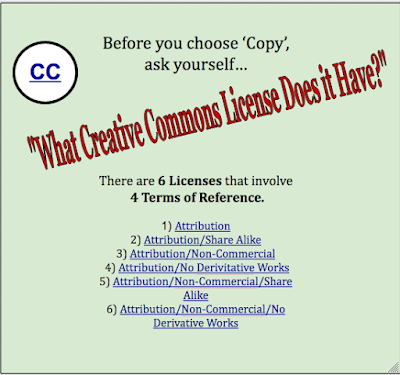
How does this connect to my teaching world?  Over the years I have inevitably seen students who have developed talents and skills in specific areas.  There is usually a student who is known as 'the artist'.  This year I had a proficient 'dragon drawer' as they called him.  It allows for a very good teachable moment the first time another student approaches him and asks him to draw one for their project. It seems simple to them, he does it best why not just ask him? Whether it's online or on paper there are soon multiple sketches around the room all made by the same student.  As presentation time approaches I ask the question, "How have you given credit to the artist?" Quiet room.  I'm sure they are trembling and thinking I will tell them to remove it because it's not theirs.  Perhaps because if it were an art class they instinctually know that you can't get someone else to do your picture.  It's an important lesson for both the taker and the sharer.  What follows is a discussion with a real life example of all the ways the artist can 'license' their work.  It seems to be best if the focus is on protecting the artist and not on what the other students did wrong.  This in-class experience makes the extension to works they create and share online easier to grasp.  As an example, I have created a very simple reminder poster that is meant to be viewed live so that the links are active.  It is a refresher of the 6 licenses and the important terms that students and teachers should know.  Have you created something? Follow this link to Choose the license that best suits you.


Creative Commons License
This work is licensed under a Creative Commons Attribution-NonCommercial-ShareAlike 4.0 International License.